Invoices for Salesforce was designed to let you add efficient billing to your operation without the need to customize Salesforce. The application automatically creates invoice records and invoice PDF documents straight out of your sales records, based on the invoice templates assigned to the sales. These templates include dynamic data from your records, expressed in terms of merge fields associated with fields in your sales and products objects, that the application use to automatically maintain the customization of the Invoice and Invoice Line Item objects used to capture the invoices for you. (This only applies to Enterprise, Unlimited, and Developer Editions of Salesforce. Professional Edition users need to customize these objects manually as described here).
Consequently, the invoice invoice templates depend on the customization of your sales and product objects. Specifically they depend on the fields of these objects you add to the templates to exist at the time of creating the invoices. If any of these fields, or they parent objects, is deleted after it was included in an invoice template, the invoice template becomes invalid in that your organization is missing fields that were included in the template so that at the time of creating the invoices these merge fields are replaced with data from your records. Invoices for Salesforce checks before billing and when creating a new template or editing existing ones that all the templates are valid in that none of the fields associated with the merge fields included in the templates are missing from your organization. These checks are called Invoice Templates Integrity Checks
For example. Say you want to add a discount to your sales and to that end you create a new custom field for the Opportunity named Discount and of type percent. Further, assume that you include the discount in your invoices, so you add its merge field to your invoice template, or templates. Then, at some point after you created or edited your template to include the discount custom field, you remove it from the Opportunity object, making the template invalid. If you then try to process invoices for your sales in either bulk or single invoice modes, or you try to create a new template or edit an existing one, you get the following message:
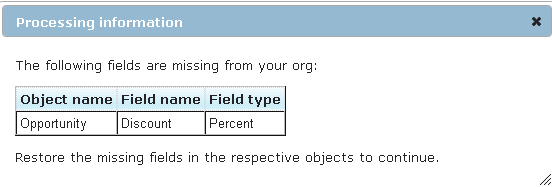
The message lists the missing fields, and objects if any, and gives you all the information necessary to restore the field as follows:
In order to fix this in this example follow these steps:
Follow the above procedure to undelete or create fields of any standard object, or follow the custom object field undelete or creation procedure to restore fields of custom objects.
The application will not let you proceed until the missing fields are restored in order to preserve the invoice templates integrity which is an important aspect of invoices accuracy. In the event the missing field was intentionally deleted because you do not need it anymore but it is still included in one of the invoice templates, follow these steps: